两套高质感图片编辑提示词分享:把人像照片做成「搪胶玩偶」与「手工拼豆」对照海报
分享两套实测效果很稳的人像图片编辑提示词:一套生成「原照 × 哑光软搪胶挂件」杂志风对照海报(中文提示词),另一套生成「原照 × 手工拼豆钥匙扣」实物摄影对照海报(英文提示词)。两套提示词对应两种不同材质风格与写法体系,构图思路相通;其中的标题、批注、编号、比例和场景细节都可以按自己的照片自由修改。
平时用 AI 改人像照片,最容易翻车的不是「画不像」,而是直接生成一张光秃秃的卡通图——缺少对比感,也缺少实体质感。
这次分享两套可以直接复制使用的图片编辑提示词,思路相通但分别对应两套不同的材质风格与提示词体系:
- 方案一(中文提示词):原照 × 哑光软搪胶玩偶对照海报——上原照、下潮玩手办实拍,配杂志感大标题和手写细节批注;
- 方案二(英文提示词):原照 × 手工拼豆钥匙扣对照海报——上原照、下带真实热熔孔洞和厚度的手工拼豆挂件,带复古纪念品与编辑设计质感。
这两套提示词里的文案、编号、比例、配色、手势和场景细节都可以按你的照片自由修改,不必一字不差照抄。文末整理了「常见可改项速查表」,照着替换一两句就能玩出不同风格。
一、方案一:原照 × 搪胶玩偶对照海报(中文提示词)#
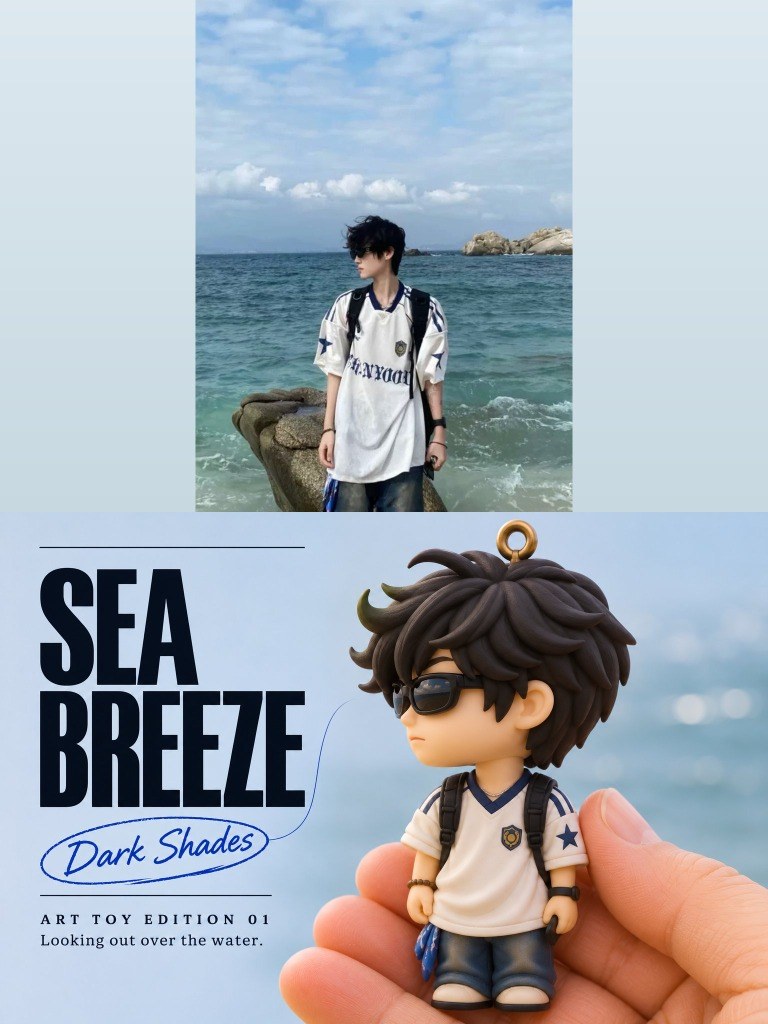
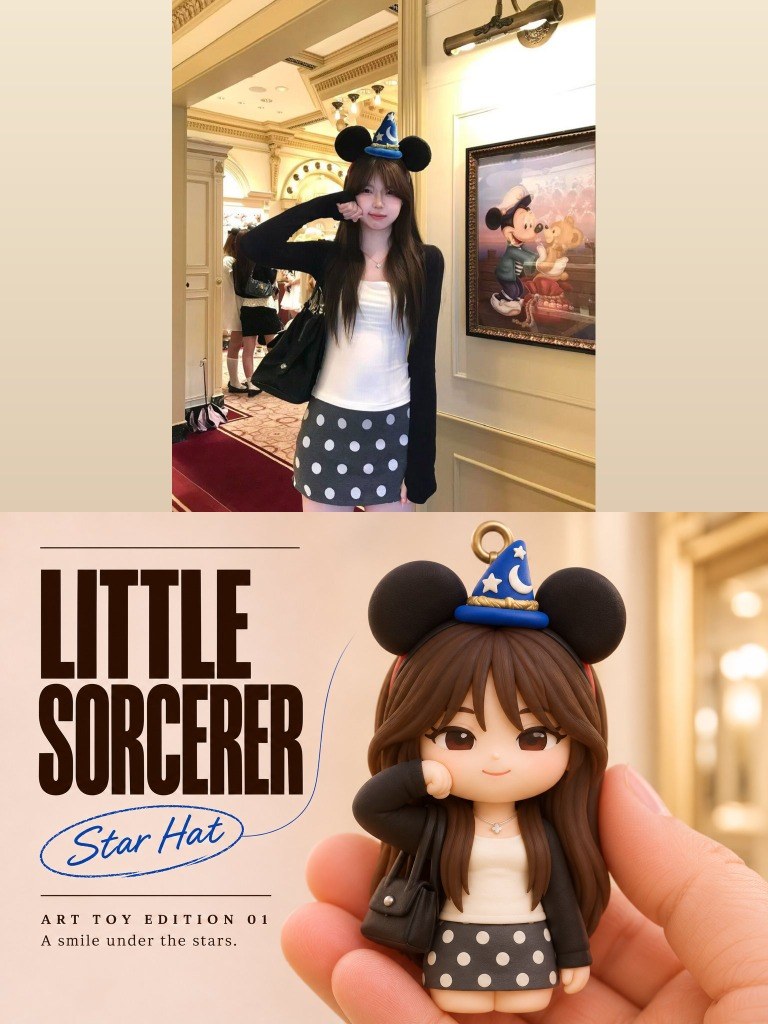
适合日常穿搭照、旅行照、主题乐园打卡照。它会保留人物最容易被认出的发型、表情、服装细节和随身道具,做成一个 7–10 厘米的哑光软搪胶挂件由真人手托住,左侧排两行粗体英文大标题与手写批注。
1. 直接复制提示词#
上传你的 1 张或多张人像照片后,直接发送下面这段提示词:
把我上传的人像做成一张「原照 × 搪胶玩偶」对照海报。每个人单独做一张,多张按上传顺序出图。有版式参考图时,沿用它的构图和字体层级,人物、穿搭和道具以当前原照为准。

【上半 · 原照】
把原照等比居中嵌入,不裁切。左右空间用从照片取色的浅色填满。若原照来自轮播截图,局部修掉两侧的圆形箭头和底部的分页小点,补回被遮住的衣料、背景和线条。保留衣服原本的波点、人物表情和构图。

【下半 · 玩偶】
把人物做成约 7–10 厘米的哑光软搪胶挂件,大头小身,发束有雕塑感,头顶加小金属吊环。保留原照里最能认出这个人的特征,包括脸部朝向、视线、表情、发型、穿搭、手势和随身道具。按每个人的神态设计五官,避免套用同一张脸。

玩偶放在右侧,由真人手从右下方托住。保留自然的手指接触、阴影和柔和反光,让它看起来像实拍的实体收藏件。背景配色呼应原照,用浅景深,左侧留出连续的干净空间。

【下半左侧 · 字体与设计】
用两行超粗、窄体、全大写的英文标题做视觉中心,左对齐,行距紧凑。标题上方放一条细横线。标题下用从人物服装或道具取色的手写字,写一个 1–3 词的细节批注,配手绘椭圆和细引线。引线避开脸和手。

批注下方用细横线分隔,排一行字距较宽的小字 ART TOY EDITION 01,再放一句英文短描述。标题和批注根据这一张的人物来写。例如 LITTLE / SORCERER 配手写 Star Hat,SEA / BREEZE 配手写 Dark Shades。

【输出】
3:4 竖图,1536 × 2048,上下各占一半。先生成无字的 3:2 玩偶图,再拼接原照和排字。交付前检查英文拼写,并放大上半确认轮播箭头和分页圆点都已清干净。二、方案二:原照 × 手工拼豆钥匙扣对照海报(英文提示词)#
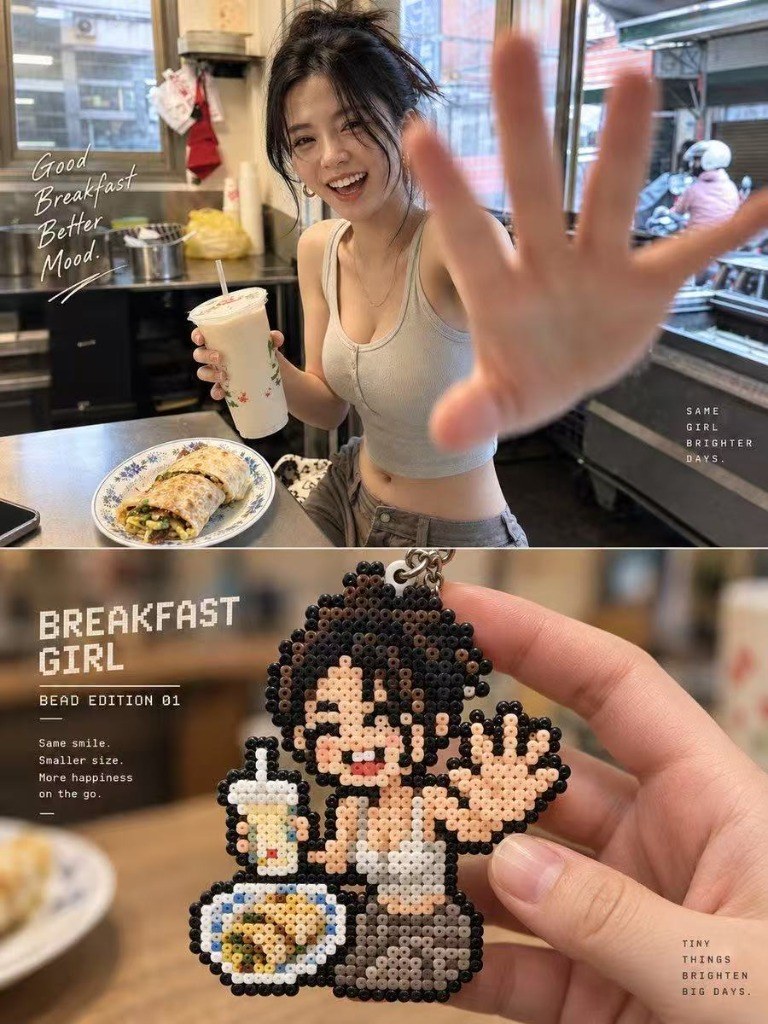
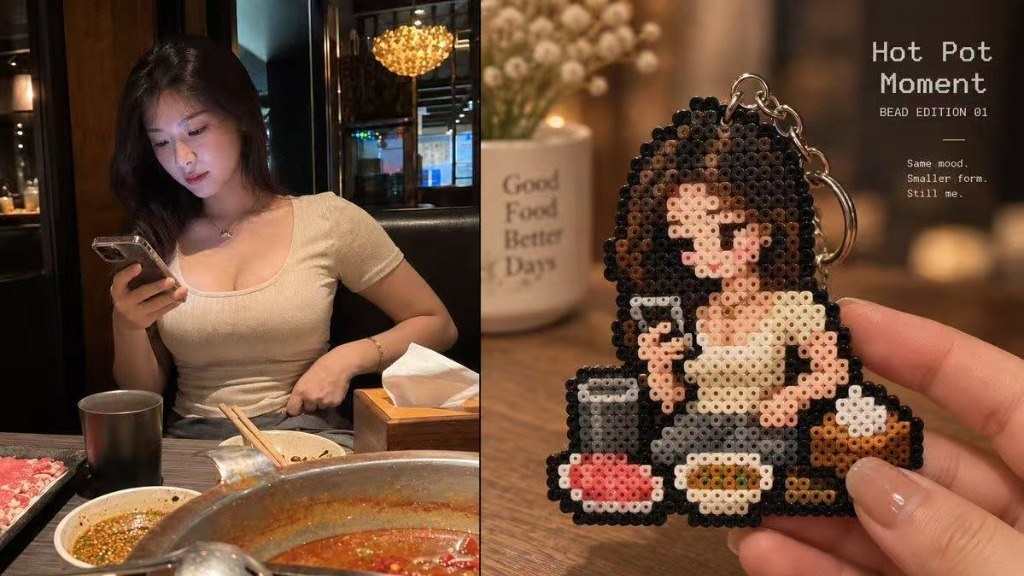
这一套对应英文提示词体系,核心亮点在于强约束了真实拼豆的物理质感——要求画出每一颗圆柱形塑料豆的中心小孔、热熔粘连、微融边缘和实体厚度,而不是扁平的像素贴纸,非常适合日常美食、探店、咖啡馆等生活感照片。
1. 通用版提示词(任意人像可直接复制)#
上传人像原照后直接发送,模型会自动根据你的照片提取人物特征、7–12 种拼豆主色以及对应的英文短标题:
Please turn each portrait photo I upload into an independent high-end design poster, outputting each photo separately without stitching multiple images together.

The overall composition uses a 3:4 vertical layout, setting clear upper and lower contrast areas. The top and bottom proportions are roughly balanced, with a clear and clean horizontal boundary in the middle, but the original photo must not be stretched or distorted.

The upper part faithfully preserves the original portrait, accurately maintaining the person's identity, facial features, expressions, hairstyle, clothing, posture, gestures, personal items, environment, lighting, and original color relationships, only adding slight editorial photographic color grading and very fine film grain. The person must not be redrawn or their identity changed.

The lower part summarizes the person's most recognizable hairstyle, main clothing colors, posture, and two to four key objects from the photo into a single-outline physical Perler bead travel keychain.

The Perler bead work must be composed cell-by-cell from a large number of cylindrical plastic beads with central holes. Clearly represent the hole in each bead, the highlight on the plastic surface, thermal melting connections, slightly fused edges, black or dark bead outlines, and the thickness of the real object. It must look like a truly completed handmade Perler bead physical object, rather than digital pixel art, a printed pattern, or a flat sticker.

Retain the person's instantly recognizable hairstyle, face direction, clothing color blocks, posture, and representative objects, but compress details so that the person and objects form a complete, clean, die-cuttable keychain outline. Use a limited palette of 7–12 bead colors extracted from the original photo.

The Perler bead keychain occupies about 52%–72% of the width of the lower part, held, gripped, or lightly pinched by a real natural hand, presenting a believable hand-held scale. The background is a real environment with shallow depth of field, retaining at least 30% continuous low-information negative space. Only one Perler bead work can appear in each image; do not make it into a multi-piece set or display rack.

Text must not be printed inside the Perler bead keychain. Generate a short English title based on the photo, paired with “BEAD EDITION 01” and a short observation text, placed in the quiet peripheral background. The font uses clear small pixel fonts or restrained print fonts and must be completely readable.

Overall, it has the texture of a combination of handmade souvenirs, physical collectible photography, and modern editorial design, being compact, vivid, real, and touchable, while retaining the character of the original person.

Avoid digital pixel illustrations, flat stickers, brand logos, crochet textures, squares without holes, fake hands, multiple keychains, gibberish, author names, QR codes, and watermarks.
2. 进阶微调段(按具体照片选配追加)#
如果原照里有遮挡前景(比如离镜头很近的手掌)、或者你想把人物与保留的小道具定得更死,可以在通用版末尾追加一段针对当前照片的补充说明。下面是上方「早餐店女生」案例实际追加的段落——换其他照片时请按你的真实人物和道具改写,不要直接照抄里面的性别或咖啡杯描述:
Keep the original 3:4 vertical comparison layout with a clear, straight horizontal divider: the upper half must show the supplied portrait photograph itself, fully visible and recognizable, while the lower half shows one real handmade Perler-bead keychain recreating the same clearly adult woman. Give both halves equal visual weight so the original and object can be compared at a glance. Build the bead portrait from her smiling face, dark loosely tied hair and light top, with only a few recognizable café details such as the takeaway cup and plate; do not reproduce the oversized foreground palm in the charm. Show individual bead center holes, melted joins, raised thickness and a small keyring. Keep text and decoration secondary; no other people, male figures, reflections, extra charms, or single-frame product-only composition.三、哪些地方可以按自己需求修改#
两套提示词虽然分别采用中文和英文结构,但本质上都是「原照保护 + 实体挂件化 + 留白排版」的模块化模板。你完全可以按需改写其中的任意片段:
| 想改什么 | 怎么改(示例) |
|---|---|
| 大标题与小批注 | 把示例里的 SEA BREEZE / Dark Shades 或自动生成标题,直接指定成你想要的词(例如 WEEKEND WALK、COFFEE TIME,也可以改成中文短标) |
| 系列编号文案 | 把 ART TOY EDITION 01 或 BEAD EDITION 01 改成 MEMORY NO.07、2026 SUMMER、日期或你们情侣/朋友的纪念编号 |
| 构图方向(竖版 / 横版) | 默认是 3:4 上下对照;如果像上面的火锅店示例一样想做横版,把 3:4 vertical / 上下各占一半 改成 16:9 横版,左原照、右挂件 即可 |
| 过滤多余杂物 | 原照如果是小红书/相册截图,可保留去轮播箭头说明;如果照片里有路人或抢镜前景,直接补一句「挂件里去掉路人 / 去掉前景遮挡物」 |
| 保留特定道具 | 在提示词里点名 1–3 个最代表性的物件(如墨镜、奶茶杯、吉他、宠物、相机),成品辨识度会高很多 |
四、怎么用效果最好#
- 直接用支持图生图 / 图片编辑的模型:在 ChatGPT 客户端、GPT Image 2.6 / 2.5 或接入鹊桥生图接口的工具里,先上传清晰的正脸或半身原照,再把整段提示词发出去即可。
- 想要统一系列感,顺手传一张参考图:如果想把一组旅行照做成同一套明信片,第一张出满意后,后面几张把第一张成品一并上传当「版式参考图」,字号和排版层级会非常统一。
- 一次没完全中意,直接补一句微调:比如「标题改成
SUMMER DAY」「挂件再放大一点」「不要把前景的手画进拼豆里」,不用整段重写。
相关阅读:GPT Image API 怎么调用?参数、返回格式、图片编辑与报错排查 · 中英文「去 AI 味」Skill 怎么用?qu-ai-wei + Humanizer 组合